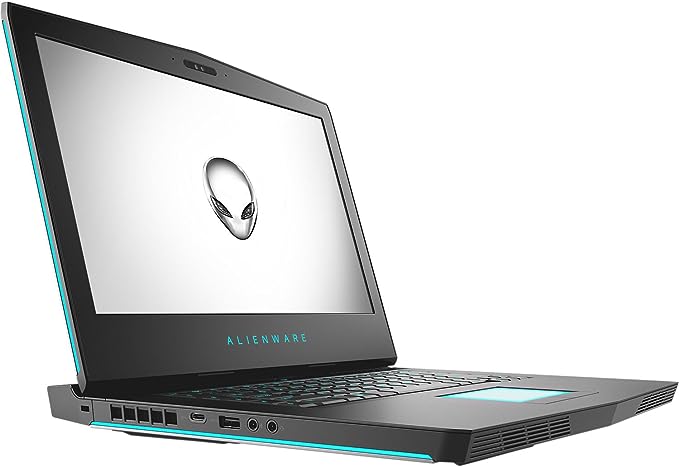
The Dell Alienware 15 R4 is a 15.6-inch gaming laptop that made its name on raw power and premium build rather than portability. Built around Intel’s six-core Core i7-8750H (with i9 options) and NVIDIA GTX 10-series graphics, it was one of the most capable—and heaviest—gaming laptops of its generation. Years on, it remains a strong value on the used market for gamers who want desktop-class performance and do not mind the bulk. This review covers its specs, gaming performance, display options, build, cooling, battery, and whether it is still worth buying.
Verdict: Is the Alienware 15 R4 Worth It?
If you want a big, powerful gaming laptop and can find one at a good used price, the Alienware 15 R4 delivers. Its combination of a six-core CPU, up to a GTX 1080, a premium magnesium-alloy chassis, and genuinely effective cooling means it still handles modern 1080p gaming and demanding creative work with ease. The trade-offs are exactly what you would expect from an enthusiast machine of this era: it is thick, heavy, and its battery life is short. As a brand-new purchase it is dated, but as a used or refurbished buy it offers a lot of performance and build quality for the money.
Dell Alienware 15 R4 Specifications
| Component | Specification |
|---|---|
| Processor | Intel Core i7-8750H (6 cores); i9-8950HK on top configs |
| Graphics | NVIDIA GeForce GTX 1060, GTX 1070, or GTX 1080 (config-dependent) |
| Display | 15.6-inch Full HD (1920 x 1080); 60Hz or 120Hz, with a 4K/OLED option |
| Memory | 8–16GB DDR4 2400 MHz (upgradable to 32GB) |
| Storage | 256GB PCIe NVMe SSD + 1TB HDD (varies by config) |
| Operating system | Windows 10 Home (upgradable to Windows 11 on supported units) |
| Extras | AlienFX RGB lighting, optional Tobii eye tracking, Alienware Graphics Amplifier port |
| Weight | ~3.5 kg (7.7 lbs) |
Design and Build
The Alienware 15 R4 is unmistakably an Alienware: an angular, aggressive design with signature AlienFX RGB lighting on the keyboard, logo, and light bars. More importantly, it is built like a tank. The magnesium-alloy and “Epic Silver” or “Nebula Red” chassis feels genuinely premium and rigid, with almost no flex. The flip side is size: at around 3.5 kg and over an inch thick, this is a desktop replacement you move occasionally, not a daily carry. As Tom’s Hardware put it in its review, this is a case of “bulk equals power.”
Display Options
Most units shipped with a 15.6-inch Full HD panel, and the one to look for is the 120Hz version—its high refresh rate makes fast-paced games noticeably smoother and is a real advantage for competitive play. Base models used a 60Hz TN panel with weaker viewing angles, while higher-end configurations offered a 4K panel (and even an OLED option). For gaming, the 120Hz FHD screen hits the sweet spot of speed and GPU headroom.
Gaming Performance
Performance depends heavily on which GPU your unit has:
- GTX 1060 (6GB): solid 1080p gaming—esports titles run very high, and AAA games run well at medium-to-high settings.
- GTX 1070 (8GB): the sweet spot—comfortable 1080p high/ultra gaming at 60+ FPS in most titles, and enough headroom to make good use of the 120Hz panel in lighter games.
- GTX 1080 (8GB): the most capable—high-refresh 1080p and even entry-level 1440p/VR performance in its era.
Backed by the six-core i7-8750H (or the unlocked i9-8950HK), the R4 rarely bottlenecks in games and has plenty of CPU muscle for streaming, editing, and heavy multitasking. For a used machine, a GTX 1070 configuration in particular remains a very capable 1080p gaming laptop today.
Cooling and Thermals
This is where the R4’s size pays off. Alienware’s Cryo-Tech cooling—dual fans, generous heatpipes, and rear/side exhaust—keeps the powerful components in check under sustained load far better than thin-and-light gaming laptops. It runs loud under full load, as expected, but it holds performance without the aggressive thermal throttling that plagues slimmer machines. That cooling headroom is a big reason the R4 still performs well years later.
Keyboard, Ports, and Features
The TactX keyboard is a highlight: comfortable travel, per-key AlienFX RGB, and dedicated macro keys. Port selection is excellent—USB-A, USB-C/Thunderbolt 3, HDMI, mini-DisplayPort, Ethernet, and Alienware’s proprietary Graphics Amplifier port, which let you attach an external desktop GPU. Some configurations also included Tobii eye-tracking. In short, connectivity and features are enthusiast-grade.
Battery Life
Battery life is the expected weak spot. With power-hungry components and a large, bright display, expect only a few hours of light use and far less while gaming. This is a plugged-in machine by design; the battery is for moving between outlets, not all-day untethered use.
Pros and Cons
Pros:
- Powerful CPU/GPU combinations, up to i9 and GTX 1080
- Premium, rock-solid magnesium-alloy build
- Excellent Cryo-Tech cooling and sustained performance
- 120Hz display option and comfortable RGB keyboard
- Great connectivity, including Thunderbolt 3 and Graphics Amplifier
Cons:
- Very heavy and thick—poor portability
- Short battery life
- Base 60Hz TN panel is weak (aim for the 120Hz or better)
- Dated as a new purchase; premium price when new
Who Should Buy the Alienware 15 R4?
The R4 suits gamers and creators who want desktop-class power and premium build in a laptop and are happy to keep it mostly on a desk. If you find a used GTX 1070 or 1080 configuration with the 120Hz screen at a fair price, it is a lot of machine for the money and still very capable at 1080p. If portability or battery life matters most, a newer, thinner laptop is the better fit.
Frequently Asked Questions
Is the Alienware 15 R4 good for gaming in 2026?
Yes, especially GTX 1070 and GTX 1080 configurations. They still handle 1080p gaming at high settings, and the strong cooling means the hardware performs to its potential rather than throttling.
What graphics card does the Alienware 15 R4 have?
Depending on configuration, it shipped with an NVIDIA GeForce GTX 1060, GTX 1070, or GTX 1080. The GTX 1070 is widely considered the value sweet spot.
Can you upgrade the Alienware 15 R4?
Yes. RAM is upgradable (up to 32GB) and storage can be added or swapped, which is the best way to keep a used unit fast and capacious.
Does the Alienware 15 R4 support Windows 11?
Many units meet Windows 11 requirements and can be upgraded, but confirm TPM and firmware settings on the specific machine before updating.
Why is the Alienware 15 R4 so heavy?
Its weight comes from a rigid magnesium-alloy chassis and a large, robust cooling system. That bulk is the trade-off for its durability and its ability to sustain high performance under load.